Android · coming soon to Google Play
Proof of purchase, ready at the return desk.
Photograph a receipt. ReceiptVault reads it, keeps track of the return and warranty deadlines, and reminds you before they close. Card numbers are blacked out and each page is encrypted on your phone before it's stored.
Extracted values are AI estimates. You check and correct them before anything is saved.
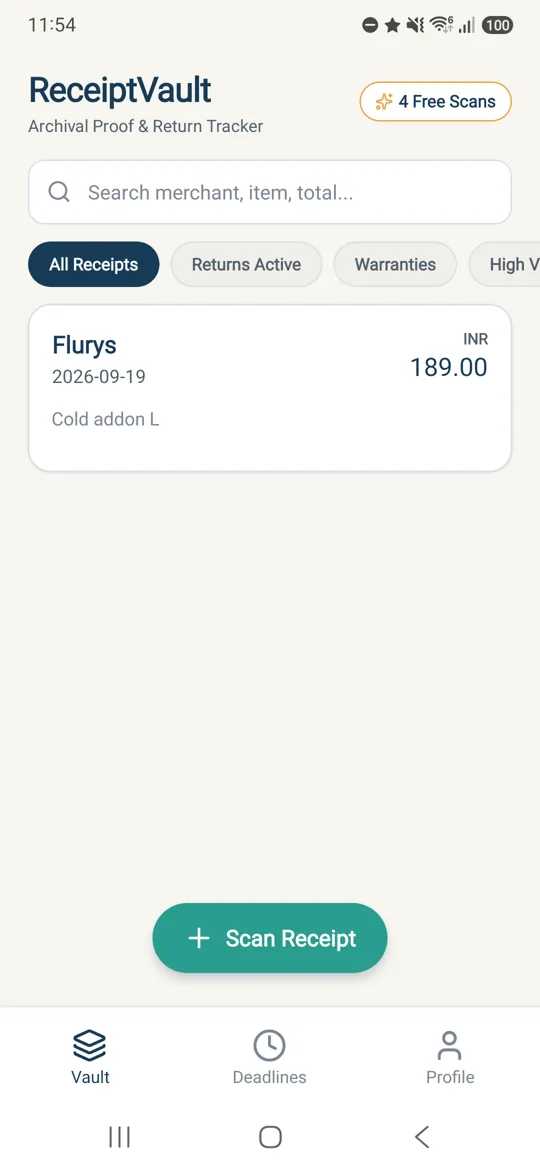
Most receipts live in a drawer, a wallet, or a camera roll of 8,000 photos. None of those tell you the return window closes on Thursday.
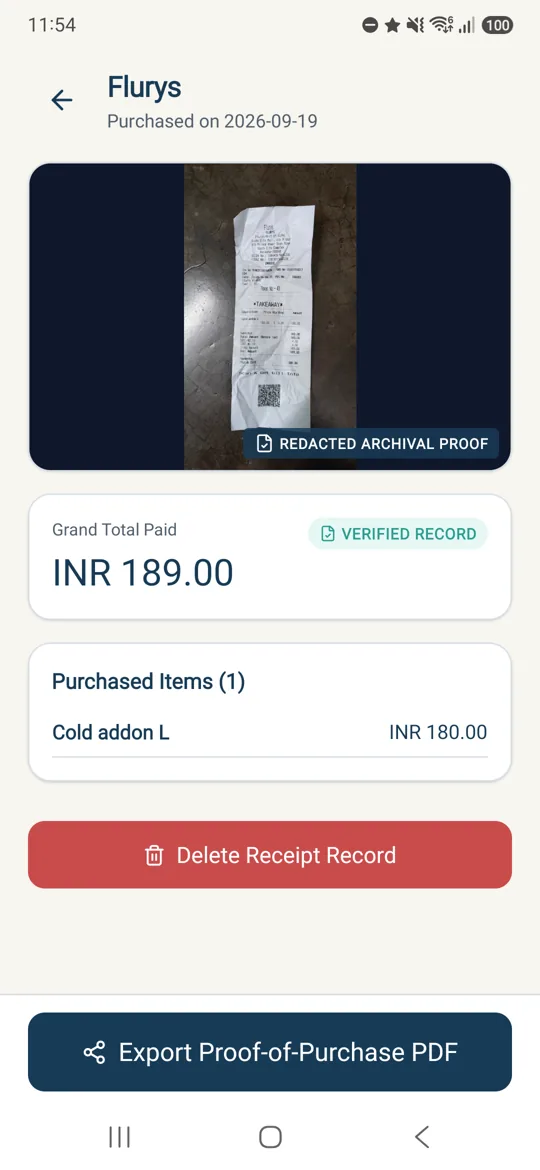
How it works
From crumpled paper to proof the shop will accept.
-
01 · Capture
Photograph or import
Shoot the receipt or pick it from your gallery. A multi-page bill is saved as one record, not four loose photos.
-
02 · Review
Correct it before you save
The merchant, date, total, line items and deadlines arrive as a draft you can edit. Nothing is stored until you accept it.
-
03 · Find & share
Get reminded, then show the proof
A notification arrives before the return or warranty window closes. One tap makes a PDF that gives the shop the proof it asks for.
- Search every receipt by shop, item or total
- Filter by open returns and active warranties
- Export proof-of-purchase PDFs
Why this app is careful
A receipt carries your card number. ReceiptVault treats it that way.
The original photo is sent to Google's Gemini service so it can be read. Before a copy is stored in your vault, ReceiptVault masks and encrypts it on your phone.
As photographed
VISA4539 1488 0343 6467
TEL98300 12345
SIGNA. Sen
Saved to your vault
VISA
TEL
SIGN
- Masked
- Blacked out, not covered up. Card digits, account numbers, signatures and personal phone numbers that the app detects are burned into the saved image as solid bars. Check the preview, because AI can miss a sensitive area.
- Encrypted
- Encrypted on the device. The masked page is encrypted with AES-256-GCM on your phone. Only ciphertext reaches storage, and its key is wrapped by Google Cloud KMS.
- No GPS
- Never your location. The app doesn't request or read your device location. If it shows where you bought something, that comes from the address printed on the receipt.
*** Please check your receipt ***
An estimate is not a guarantee.
ReceiptVault reads receipts with AI, and AI misreads faded thermal paper, unusual date formats and handwritten totals. Return and warranty dates are worked out from what it read and from the policy printed on the page, not from any agreement with the shop. Check the values before you rely on them, and confirm the actual policy with the shop.
A filing cabinet with an alarm clock, not a legal adviser.
Is this an expense tracker?
No. ReceiptVault is for proving a purchase happened when you need a refund, a replacement or a warranty repair. It doesn't categorise spending, connect to your bank or build budgets.
What happens to the original, unmasked photo?
The page as you photographed it is sent once to Google's Gemini API so it can be read. ReceiptVault doesn't keep it; the copy saved to your vault is the masked, encrypted one. The privacy policy has the full detail.
Does the app track where I shop?
It never reads your device location. If a receipt prints a store address, that address is saved with the receipt, and the "open in maps" button passes it to your own maps app as text. Any coordinates shown are an AI estimate and are labelled that way.
Do I need an account?
You can look around as a guest. To save an encrypted receipt image you need a recoverable email or Google account; otherwise a reinstall would lose the vault and there would be no way to return your data to you.
How do I delete everything?
In the app, go to Profile → Delete Account. That removes your profile, your receipt records and your stored images. You can also submit the account and data deletion request form. Deletion is permanent.
What does Pro cost?
The free tier includes a limited number of scans, and Pro removes that limit. Google Play shows the current price in your currency, the billing period and any trial inside the app before you're charged.